VPNbase.NET — This article will explain in full about How to Share a VPN Connection From Laptop to Smartphone.
VPNs do have a lot of functions. Be it on Android or on a computer. But sometimes we want to share the connection on our computer to our smartphone.
Its main function is, so that smartphones can also enjoy VPN on the computer. In addition, on smartphones there is also no need to install the VPN application anymore. A VPN just needs to be installed on the computer.
Share a VPN Connection From Laptop to Smartphone
The first thing you do, of course, first connect the VPN to your computer and make sure it’s connected.
After that, download the MyPublicWiFi application. Because we need an application’s help to share a VPN connection, we can use the MyPublicWiFi application.
Install MyPublicWiFi application
Install the MyPublicWiFi application on your computer until it’s finished.
Setting MyPublicWiFi application
For a very easy way of setting up, the important thing is that on the Internet Connection menu you select the VPN that you are using.
See an example in the image below:
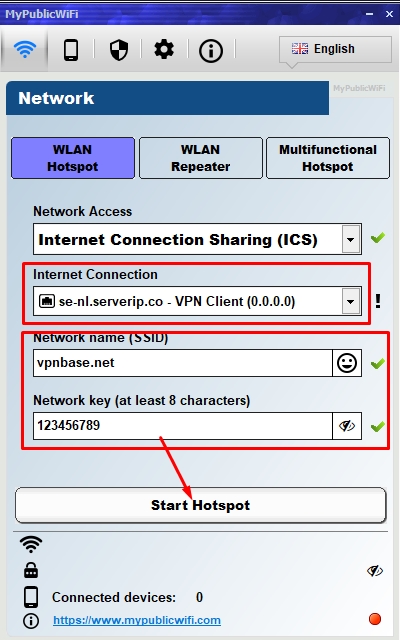
don’t forget to enter the wifi name and password. Then finally click on Start Hotsport.
Next, on another device, or on a smartphone, you just need to connect like you would connect to wifi in general. No need for any settings on the client to be connected.
Conclusion
With the help of the MyPublicWiFi application, now you can easily share the VPN connection on your computer to Android, or other devices.