VPNbase.NET — Mostly, WireGuard is used for android and iOS. But How to Use WireGuard on Windows 10? This article will explain in detail.
WireGuard is an exciting new VPN protocol that has the potential to make a big difference to the VPN industry.
Using WireGuard can speed up your internet connection, because this WireGuard type VPN is known for its speed apart from V2ray.
Compared to existing VPN protocols, such as OpenVPN and IPSec, WireGuard can offer faster speeds and better reliability with new and better encryption standards.
Not only that, WireGuard is very simple to use, be it on Android, iOS or PC computers. For now, Linux users can install WireGuard as kernel material. It’s like you modify the Linux kernel as well as enhance the code you like.
How to Use WireGuard on Windows 10
Using WireGuard on windows requires application assistance, the same as using on Android. You can use the default application from WireGuard or you can also use the tunsafe application.
To use WireGuard using the official application from WireGuard you can download it on the official website or the link below.

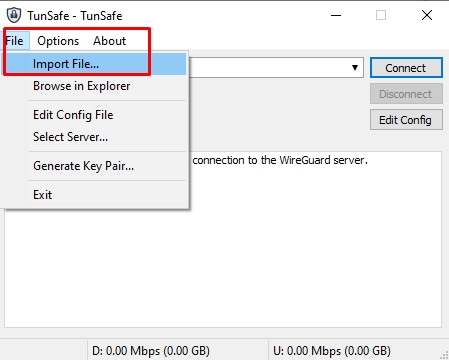
Then you can also use the help of the Tunsafe application to use WireGuard on windows.
- tunsafe.com
The two list of applications above have the same function. You can use either one.
For how to use it, it’s very easy, you just need to import the Wireguard config then connect it.

If you don’t know where you can create a Wireguard account, you can create one for free on the fastssh.com site.
Conclusion
By following the tutorial that we explained above, you can use Wireguard on Windows, be it Windows 10, Windows 7 and Windows 8.
Hopefully this information about Wireguard VPN is useful for you. And don’t forget to share.